What Is A BCF File? A Plain Guide.
BCF, the BIM Collaboration Format, is the open format for sending issues about a building model from one tool to another, without sending the whole model again.
A Message About A Model, In An Open Format.
When a coordinator finds a problem in a model, an email saying "the duct on level 2 is in the way" is not enough. The designer has to find the duct, in their own tool, in a model of tens of thousands of elements. A BCF issue carries the problem and its location together.
BCF is maintained by buildingSMART, the organisation behind IFC. IFC carries the model. BCF carries the conversation about it.
Everything Needed To Find And Fix It.
- A title, a description and a status, such as open, assigned or closed
- A priority and the person it is assigned to
- A viewpoint: the camera position and view of the model where the problem is seen
- The elements concerned, identified by their IFC GlobalIds
- A thread of comments, so the discussion stays with the issue
Two Formats, Two Jobs.
IFC (Industry Foundation Classes) is the file format for the building model itself: its elements, their shapes and their properties. A BCF file does not contain the model. It points at elements in it, so the receiving tool can open the issue at the right place in its own copy of the model.
Because both formats are open, the team can mix tools. One discipline can model in one authoring tool, the coordinator can check in another, and the issue still arrives where it is needed.
What A BCF File Contains.
BCF, the BIM Collaboration Format, is maintained by buildingSMART International, the organisation behind IFC. Versions 2.1 and 3.0 are both in wide use. A BCF file (with the extension .bcf or .bcfzip) is a compressed folder with one entry per issue, called a topic.
Each topic holds a description of the issue in a structured text file, one or more viewpoints that record the camera position and the elements involved, and usually a snapshot image. Because the viewpoint names elements by their IFC identifiers, a designer's tool can jump straight to them in the designer's own model.
BCF can also be exchanged directly between two systems through the BCF API, without a file. Both carry the same information.
From The Coordination Meeting To The Next Model.
- The coordinator raises issues on the federated model and exports them as a BCF file
- The designer opens the file in the authoring tool; most tools read BCF, natively or through a plug-in
- Clicking an issue restores the camera and selects the elements, so nothing has to be searched for
- The designer changes the model, adds a comment and updates the issue's status
- The updated issues come back, together with a new IFC version of the model
- The next clash check confirms whether the change really cleared the problem
Issues That Get Fixed.
- One issue per problem, with a title that says what and where
- An owner and a due date on every issue
- Statuses used the same way by every team
- A viewpoint that shows the problem clearly, with the elements involved selected
- Close an issue only when the next model version shows it is fixed
Issues Leave As BCF.
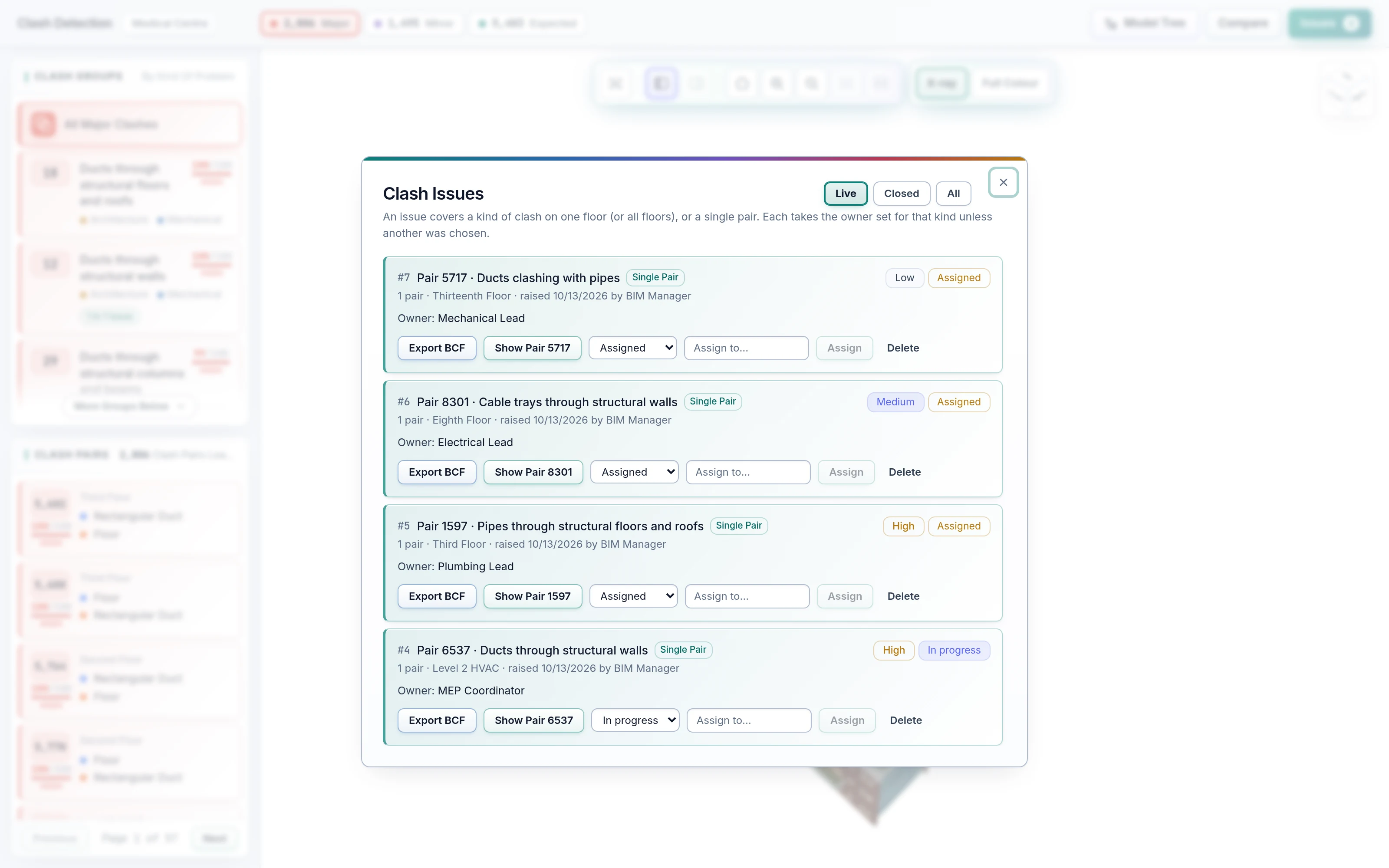
In SpaceDesignX the AI Coordinator creates issues from clashes, assigns them, and exports them as BCF 2.1 with viewpoints and element IDs. Owner, priority and status travel with each issue, and each clash has at most one live issue.
Common Questions.
What Are IFC, BCF And openBIM?
IFC (Industry Foundation Classes) is the open file format for building models. BCF (BIM Collaboration Format) is the open format for issues, carrying a comment, a viewpoint and the elements concerned. openBIM is the approach of exchanging data in open formats such as these, so teams can work in different tools.
Which File Formats Does SpaceDesignX Support?
IFC models (IFC2X3 and IFC4), BCF 2.1 for issues, and LAS, LAZ or E57 laser scans, plus text point files such as XYZ and PTS. Scaled plan sheets leave as PDF.
Does It Work With Models From Any BIM Authoring Tool?
Yes, through IFC, the open standard that every major authoring tool can export. No plug-ins and no special preparation of the model are needed, and issues go back to the designers as BCF to open in their own tools.
How Are Review Comments Tracked And Sent Back To The Designers?
Each comment is an issue with an owner, a priority and a status (open, assigned, in progress or closed), tied to the element it is about. Issues are exported as BCF, the open issue format, so designers see each one with its viewpoint in their own modelling tools.
See Your Own Model In SpaceDesignX.
Send us a model you know well. We will walk you through it live in the products that fit your work: approvals, clash detection, defects and handover, or carbon.