MEP Coordination, Without The Trial And Error.
Ducts, pipes, trays and sprinklers compete for the same ceiling void. SpaceDesignX finds every clash between them and the structure, groups them by cause, and proposes a reroute that has been checked on the whole building.
Every Trade Models Its Own Services. The Ceiling Void Is Shared.
Mechanical, electrical, plumbing and fire engineers each design in their own model, and each model is right on its own. Put together, they ask the same few hundred millimetres above the corridor ceiling to hold ducts, pipes, cable trays, sprinkler mains and a beam.
The combined model produces thousands of clashes. Most are harmless or repeat one cause. A few are real, and a move that clears one clash often creates three more somewhere else. Coordinators spend most of their time sorting the list.
Fewer Decisions, Each One Checked.
Clash Groups
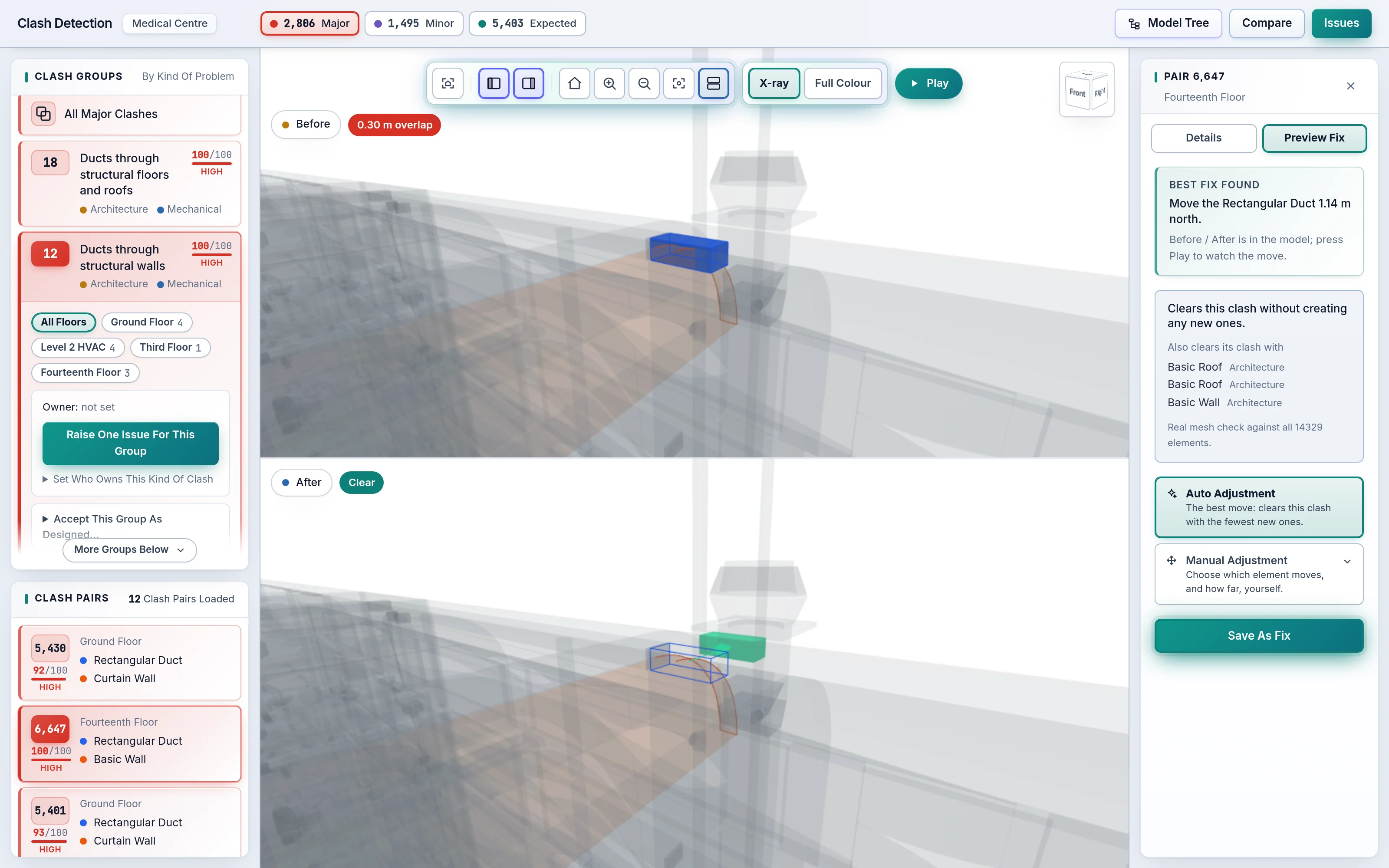
Clashes that share one cause, such as ducts through one slab, become one group. Decide once and the whole group is settled.
Fix By Cause
For connected ducts and pipes, SpaceDesignX follows the run. When moving one piece would cause more clashes than it clears, it suggests a reroute of the run instead.
Checked Moves
A proposed move is tested against every element in the building before it is shown, and any new clash it would create is named, never hidden.
What An MEP Engineer Sees.
- Only the clashes that involve your discipline, ranked Major, Minor or Expected with a 0 to 100 severity and the reason
- The proposed route around the beam, in 3D and on the floor plan, before and after
- What the move would hit, so you know before you redraw it
- Expected clashes, such as a pipe through its own sleeve, kept out of your problem list
- A Discipline Matrix showing where Mechanical meets Structure, Electrical or Plumbing most often
- Issues assigned by the AI Coordinator, sent to you as BCF with the viewpoint, so the change is made in your own modelling tool
Common Questions.
What Is Clash Detection In BIM?
Clash detection finds the places where elements of a building model occupy the same space, such as a duct passing through a beam. It runs on the combined model of every discipline, so the problem is found on screen during design instead of on site, where fixing it costs far more.
What Is AI Clash Detection, And How Is It Different From Traditional Clash Detection?
AI clash detection goes beyond listing overlaps. Traditional tools report every geometric overlap and leave the sorting to people. SpaceDesignX classes each clash as Major, Minor or Expected with a 0 to 100 severity and its reason, collects related clashes into Clash Groups, and proposes a fix that is checked against the whole building.
What Is A Clash Group?
A Clash Group is a set of clash pairs that share one cause, such as ductwork passing through one slab. Deciding once for the group settles all of its pairs, which turns hundreds of rows into a short list of decisions.
How Does SpaceDesignX Avoid False Positives?
By recognising what is intended. Planned openings, sleeves, a socket in its own wall and two parts of one pipe system meeting at a joint are classed Expected, with the reason, and are left out of the problem counts. The thresholds behind each verdict are settings that your own experts can change.
Can AI Resolve Clashes Automatically?
AI proposes, the engine checks, and a person decides. For a clash, SpaceDesignX finds the move that clears it while creating the fewest new clashes, checks that move against every element in the building and shows the building before and after. A person reviews it and saves it with the issue.
See Your Own Model In SpaceDesignX.
Send us a model you know well. We will walk you through it live in the products that fit your work: approvals, clash detection, defects and handover, or carbon.